
A grower’s responsibility for their produce does not end when harvest is done. Although the work to grow and harvest fresh produce takes months (or in the case of the pineapple - years), it is really only half of the battle. The second half of the work is the fast paced work of produce sales. Making sure the harvest reaches a dinner plate before it spoils is also a huge amount of work.
For smaller or diversified growers getting the fruit to market themselves is incredibly difficult, especially when large, vertically integrated operations have less overhead and more resources to out compete them on price and shipping speeds. To help ease this burden and ensure they can stay competitive, many growers choose to market and sell their fruit through a produce sales/marketing desk.
The role of a fresh produce sales and marketing operation is a complex one. It must simultaneously balance the needs of the growers; the demands of the retailers; coordinate complicated cold-chain logistics; and act as the key link for mandatory information sharing of the whole supply chain.
In this use case article, we will be highlighting the Croptracker features built to support fresh produce sales teams manage inventory and orders efficiently, while sharing interoperable data with their suppliers and customers. To help illustrate these features, we will be using a regional fresh produce Co-op sales desk as an example. This sales desk supports regional growers, supplying wholesalers and retailers directly.
The role of produce sales and marketing Co-op
The main goal of a produce sales and marketing Co-op is to sell their member’s produce quickly and fairly, ensuring the most profit returned to their growing members. This goal is challenging for a few key reasons:
-
Supply vs. consistency:
Growers operate with variable supply because produce is subject to unpredictable factors like weather, leading to high variability in volume, quality, and harvest timing. In contrast, major retailers require consistent demand met by predictable, high-volume deliveries, often year-round, to maintain full shelves and run national promotions. -
Equitable distribution vs. strict quality:
The sales desk is obligated to ensure equitable distribution by selling inventory from all its members, even smaller ones, to be "fair." However, retailers impose strict quality and specification requirements (size, packaging, etc.) and will reject loads that don't meet them, regardless of which grower produced them. -
The clock is ticking:
If the sales desk delays selling a grower's excess inventory while trying to secure a better price or a specific retailer's order, the produce could spoil, leading to a total loss for the grower. -
Logistics failures are catastrophic:
A transportation delay or cold chain breach can instantly turn a scheduled, high-value delivery into a rejected, worthless load, damaging the relationship with the retailer and costing the grower a profit. -
Data overload and disorganization:
As the link between the retailer and the grower, the produce sales desk is responsible for both collecting traceability and quality data from the grower, and passing on the necessary parts of this data in an interoperable format to the retailer or wholesale customer. With fast moving order and inventory turn over, juggling and maintaining this data flow requires significant process discipline.
Managing fresh produce sales is uniquely challenging because it requires bridging two fundamentally opposed worlds. On one side, you have the flexibility and volatility of agriculture, subject to weather and unpredictable yields. On the other side, you must meet the rigid consistency and scale demands of modern retail. All of this must be executed under the relentless pressure of a ticking shelf-life clock.
To help solve the challenges of being in the middle of these two realities, produce sales organizations must be able to get the information they need from suppliers and customers nearly instantly. Croptracker’s account and inventory linking features can provide this critical connection.
Tracking and planning inventory movement with Croptracker’s Order Desk and linked accounts
We will use an example scenario to show how our produce sales and marketing coop benefits from digitized inventory management with Croptracker. In our example we will be using Co-op to refer to a produce sales and marketing Co-op sales desk. Retailer will refer to the customers looking to buy from the Co-op and Grower will refer to the growing members of the Co-op who send their fruits and vegetables to the Co-op for selling.
Transaction types defined:
Transactions in Croptracker refers to a specific grouping of inventory and the intended movement of that inventory from one place to another. Transactions can be attached to Field Pack events, Packing events, Shipping events and Receiving events, meaning users can record harvest, pack, ship, or receive inventory in their account against an order, creating clear links between supplier (the Grower) and customers (the Retailer). There are several Transaction types in Croptracker that denote different directions and types of inventory movement.
Sales order:
A sales order transaction is created when a customer has ordered
inventory and the inventory is ready to be sent to the customer.
It will contain the details of the products on order, the
supplier and the customer address details and the date of the
order. It can be linked to a shipping manifest / Bill of Lading
(BOL).
Purchase order:
A purchase order transaction is sent from a customer to a
supplier (the Co-op) with a request for inventory. It will
contain details about what the customer is requesting, where it
should be sent and when they would like it by.
Consignment order:
In Croptracker, a consignment transaction is used to record an
order from the Co-op to the Grower for inventory. The Co-op is
requesting a specific group of products from a Grower to arrive
at a specific time for the Co-op to sell. In linked accounts,
this transaction type will create a request for inventory in the
Grower’s account and because this is a consignment, the owner of
the inventory is still the Grower until it is sent to the
Retailer by the Co-op.
Consignment sale:
A consignment sale transaction is created when a Grower sends a
group of inventory to the Co-op for sale. It will create an
inventory link and move inventory from the Co-op’s account when
they mark it as received. Although the inventory is not at the
Co-op, because it is a Consignment Sale, the owner of the
inventory is still the Grower until it is sent to the Retailer
by the Co-op.
Transfer:
A transfer transaction type is used to move inventory from one
location to another within the same organization. The ownership
of the inventory does not change and the original origin record
is maintained, but the location of the inventory is changed,
usually from one storage location to another.
Return:
A return transaction type is used to specifically point to part
of an order that is being sent back to its original location,
either due to damage to the inventory or a mistake in the order.
It will ensure the link to the original order is maintained so
any invoices or payments can be adjusted correctly.
Example scenario: incoming fast turn around order to the Co-op
Our Co-op has received a Purchase Order from a major retailer that needs to be shipped tomorrow.
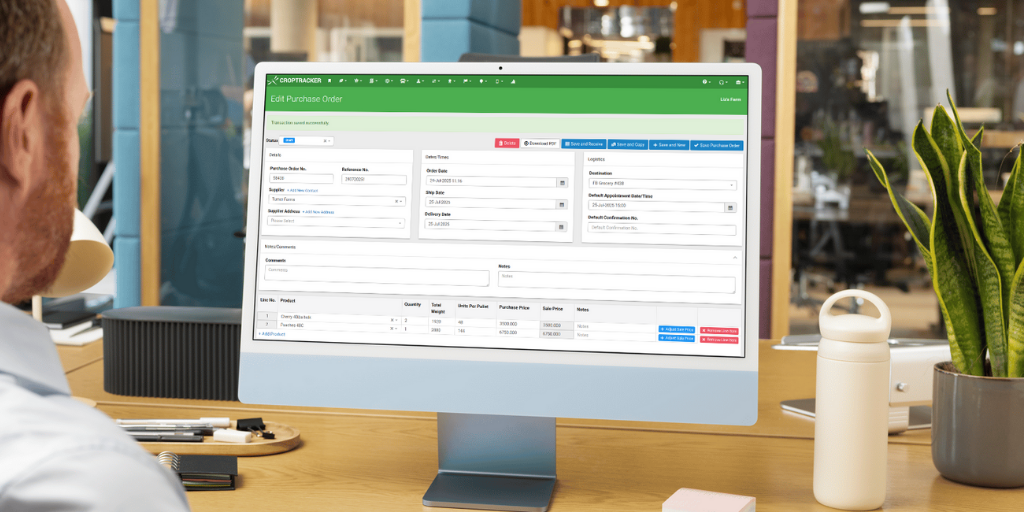
The first step is to accurately document this order and determine the availability of the products on order. To do this, an incoming Purchase Order transaction is made in Croptracker. This process can happen manually in Croptracker’s web browser, or can be generated automatically using an API connected to an external ordering system. The Purchase Order is now active in Croptacker and the PO number associated with it will follow through to the other transactions in the system related to it.
Once the order has been made to the Co-op, they must now find the inventory to meet the order. Using the linked account features and Order Desk module, the Co-op has a view of the incoming inventory from their growers and is able to determine which growers have the products they need to match the incoming order. As this order needs to go out tomorrow, they will prioritize inventory that has already been sent to the Co-op’s cold storage.
When the Grower has a load of inventory ready for sale and storage at the Co-op, they use their own Croptracker account to create a Consignment Sale transaction. In this scenario, a Consignment Sale transaction type means that the Co-op is responsible for selling this inventory on behalf of the grower and that the profit from the sale will return to the grower minus a small percentage fee to cover the operating costs of the Co-op.
The Grower will load inventory against this Consignment Sale transaction in a Shipping event by scanning inventory tags on the Croptracker mobile app and will mark the load as ‘Shipped’ when it is sent to the Co-op. This pending shipment will create a notice in the Co-op’s Croptracker account with a shipping manifest so they can prepare to receive and store this inventory.
When the truck from the grower arrives at the Co-op, the staff unloading use the Croptracker mobile app to scan the tagged inventory off the truck, logging it as unloaded and created available inventory in the Co-op’s account with a direct link back to the grower and the traceability details such as original growing location, harvest date, variety and even picker. Staff at the Co-op now record where this inventory is being stored at the Co-op by scanning the inventory as it is moved into the cold storage room.
Now that the Co-op has a record of their Grower’s inventory locations in their own storage rooms, they are able to create a Sales Order transaction that will include all the products on the original Purchase Order. The Sales Order will be attached to a Shipping event in Croptracker so that as staff at the Co-op gather products for the order, they simply need to scan the product tags to log that the requested inventory is ready to be shipped.
When all products are gathered and loaded onto the truck, the inventory will be marked as shipped to the Retailer and is removed from the available inventory at the Co-op. The traceability details of the inventory have been maintained throughout the process and can be easily followed back in the event of an issue with the inventory. As a result of this direct inventory link, the Co-op is able to pass on the payment from the Retailer to the Grower more easily. Croptracker generates product tags in GS1 standardized formats, so retailers can scan this data into their own inventory management systems directly.
Below you will find a diagram illustrating the example scenario we just walked through.
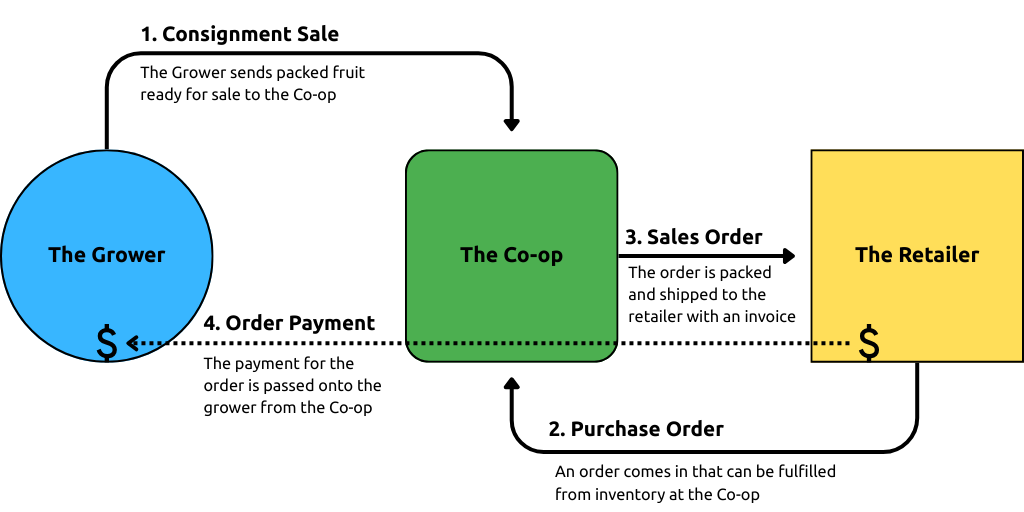
Linked inventory data sharing workflow customization
The example scenario we have used above is relatively simple, but the way Croptracker users with linked accounts are able to share data can move beyond simple inventory movement management. For instance, using Croptracker’s Quality Control module and Inventory Inspection workflows, data about produce quality can also be shared across linked accounts. Data about production practices and chemical inputs prior to harvest can also be associated with harvested inventory and shared to ensure export or growing certification requirements are met.
As part of our onboarding process with linked account users, Croptracker’s support staff will work to ensure all necessary data is shared when inventory moves between accounts. Sometimes this process will also include Croptracker’s development staff to ensure an API connection with other inventory management systems is in place. If your operation struggles with efficient inventory and order management, Croptracker can help automate parts of the process so less mistakes are made.
The challenges of managing a fresh produce sales operation—balancing the volatility of the field with the rigid demands of retail under the pressure of a ticking clock—are immense. Croptracker’s linked account and transaction features fundamentally transform this complex role. By creating a unified, automated data flow through the Order Desk module and linked transactions, Croptracker dramatically increases lead time on both incoming inventory from growers and outgoing sales orders to retailers. This interconnected system provides the sales desk with greater visibility into available inventory across all member growers, turning last-minute scrambling into proactive planning. Comprehensive visibility and automation is the essential tool for optimizing order filling for more profit and better perishable inventory management, ensuring that produce sales and marketing teams can quickly and accurately match high-quality produce to demanding customer specifications, keeping their growers competitive and profitable.