
It's July. Your crews are scaling up. Your spreadsheet has 47 tabs — one for each crew, one for piece rates, one for overtime, one for leave tracking, and one for every variety with a different pay structure.
You've been tracking labor on spreadsheets for years. They got you through. But as your crew grows, so do the mistakes. So does the compliance risk. So do the hours you spend reconciling numbers instead of managing your farm.
Labor accounts for 40 to 42 percent of production expenses for specialty crops, depending on your operation. For a farm spending $200,000 on labor each season, one missed minimum wage top-up per picker could mean thousands in underpayment liability. One rest break violation can mean fines that swallow your profit on the season's biggest block.
This article compares the real costs, risks, and capabilities of spreadsheet-based labor tracking against dedicated farm labor tracking software, using Croptracker's Punch Clock module as the example. The goal is to help you decide which system actually protects your margins during harvest.
The Hidden Costs of Spreadsheet Labor Tracking
1. Time cost: How many hours does payroll reconciliation take?
Most growers who track labor on spreadsheets spend 10-15 hours per week during peak harvest on payroll-related tasks alone: collecting paper tallies from crew leaders, entering data, running piece rate calculations, checking for minimum wage compliance, formatting reports, and fixing errors that the crew identified.
That's 10-15 hours when you need your full attention on field operations, quality control, and crew assignments. For a 12-week harvest season, that's 120-180 administrative hours. At an owner-operator rate, that time has real value.
2. Error cost: Common spreadsheet mistakes and what they
cost
Spreadsheet errors in labor tracking fall into predictable categories:
- Duplicate entries. The same bucket count enters the spreadsheet twice — the picker gets paid for work they did once.
- Missed rest breaks. You forget to deduct or separately compensate for required rest periods, creating underpayment exposure.
- Wrong piece rate applied. The Honeycrisp rate gets applied to a Gala block, or a new crew starts with an outdated sheet from last season.
- Rounding errors. Piece rate math across 50 pickers × 45 shifts compounds small discrepancies into noticeable totals.
- Overtime miscalculation. When state overtime rules apply to farm labor (California, Washington, Oregon, Hawaii), manual week-end calculations frequently miss threshold crossings.
Each type of error costs money.
Duplicates add phantom payroll.
Wrong rates create underpayment risk.
Missed overtime creates liability under FLSA and state
law.
3. Compliance risk: One error, real consequences
The U.S. Department of Labor requires employers to keep "accurate records" of hours worked and wages paid. Under the Fair Labor Standards Act (FLSA), piece-rate workers must earn at least the minimum wage when their earnings are converted to an hourly equivalent. If they fall short, you owe the difference. Manual calculations increase the chance of getting this wrong.
Regional rules add complexity:
- California requires separate compensation for rest and recovery periods (Labor Code §226.2, AB 1513). A 10-minute rest break is required every four hours, compensated at the higher of the average hourly rate or minimum wage. This compensation is outside the piece-rate calculation and must be tracked separately.
- Washington State requires employers to track and compensate incidental tasks — unloading equipment, traveling between fields, gathering supplies — at hourly rates, even for piece-rate workers.
A single compliance violation can trigger back-pay demands, penalties, and — in some cases — an audit of your entire payroll history. The cost of one spreadsheet error far exceeds the annual cost of purpose-built tracking software.
4. Data fragmentation: What happens when labor data lives in
isolation
When labor records sit in a separate spreadsheet from your harvest records, spray records, and production practices, you lose the ability to connect them. You can't easily answer: "What did it cost to pick Block 4B — and how does that compare to the revenue from that block's yield?" You can trace labor costs through to profitability at the level you need to make decisions.
What Spreadsheets Do Well
You need an honest comparison, not a sales pitch. Spreadsheets have real advantages:
- Zero software cost. Your spreadsheet program is already paid for. There's no monthly subscription, no setup fee.
- Unlimited customization. You can structure your spreadsheet any way you want. Add columns, remove them, create formulas — full control.
- Familiar interface. If you've been using Excel or Google Sheets for years, the learning curve for your crew to understand basic data entry is low.
- Good for stable, simple operations. A single crew of five people on hourly pay doesn't need software.
For a small, straightforward operation, a spreadsheet can work. This article isn't about convincing every grower to switch to software. It's about helping you recognize when the spreadsheet has outlived its usefulness.
Where Spreadsheets Break Under Pressure

Spreadsheets stop working as your operation adds complexity.
Here's where they break:
Multi-crew operations
When you have three or more crews working different blocks, the spreadsheet becomes unwieldy. Data entry multiplies. Coordination across crew leaders multiplies. When one crew leader loses their paper tally or submits it a day late, the office team has to track it down, enter it manually, and hope it matches the numbers the crew remembers.
Piece rate payroll
Piece rate is where spreadsheets show their limitations. You need to know: how many buckets each picker individually harvested, at what per-unit rate, for which variety. Then you need to convert that to an hourly equivalent and check it against minimum wage. Then you need to add rest break compensation and overtime premiums where applicable.
Doing this for 50 pickers across 6 crews, manually, every pay period — this is where errors multiply and compliance risk spikes. We discuss the tradeoffs of piece rate pay in detail, but the tracking math is the same whether you think piece rate is right for you or not.
Real-time data
Spreadsheets are office tools. They don't work in the field. Your crew leader can't update a central spreadsheet from Block 4B while wearing gloves and standing next to a scale. Paper tallies go into the field. They come back to the office. Hours or days later, they get entered into the spreadsheet. By then, any discrepancies are hard to verify and any scheduling decisions you wanted to make based on real-time productivity have already passed.
Harvest integration
When labor data lives in a spreadsheet and harvest data lives in a separate file or a packhouse system, there's no way to automatically connect them. You can't see which picker's output went into which bin. You can't trace quality issues back to the individual. You can't assign labor costs to blocks and compare them against yield.
Audit and inspection readiness
When a labor inspector asks for payroll records from last season, how long does it take to reconstruct them from spreadsheets? If you have 47 tabs, some with merged formulas and imported data, and you need to produce a clean week-by-week record for every employee for the past 14 months — it takes hours, not minutes.
Complexity multipliers
Once you add bilingual workers (who may need records in both languages), seasonal leave tracking, worker safety records, and varying overtime rules by region — the spreadsheet becomes a maze of conditional formatting, nested IF statements, and fragile formulas. One deleted row can break a dozen formulas and you won't know until payroll is wrong.
How Punch Clock Handles What Spreadsheets Can't
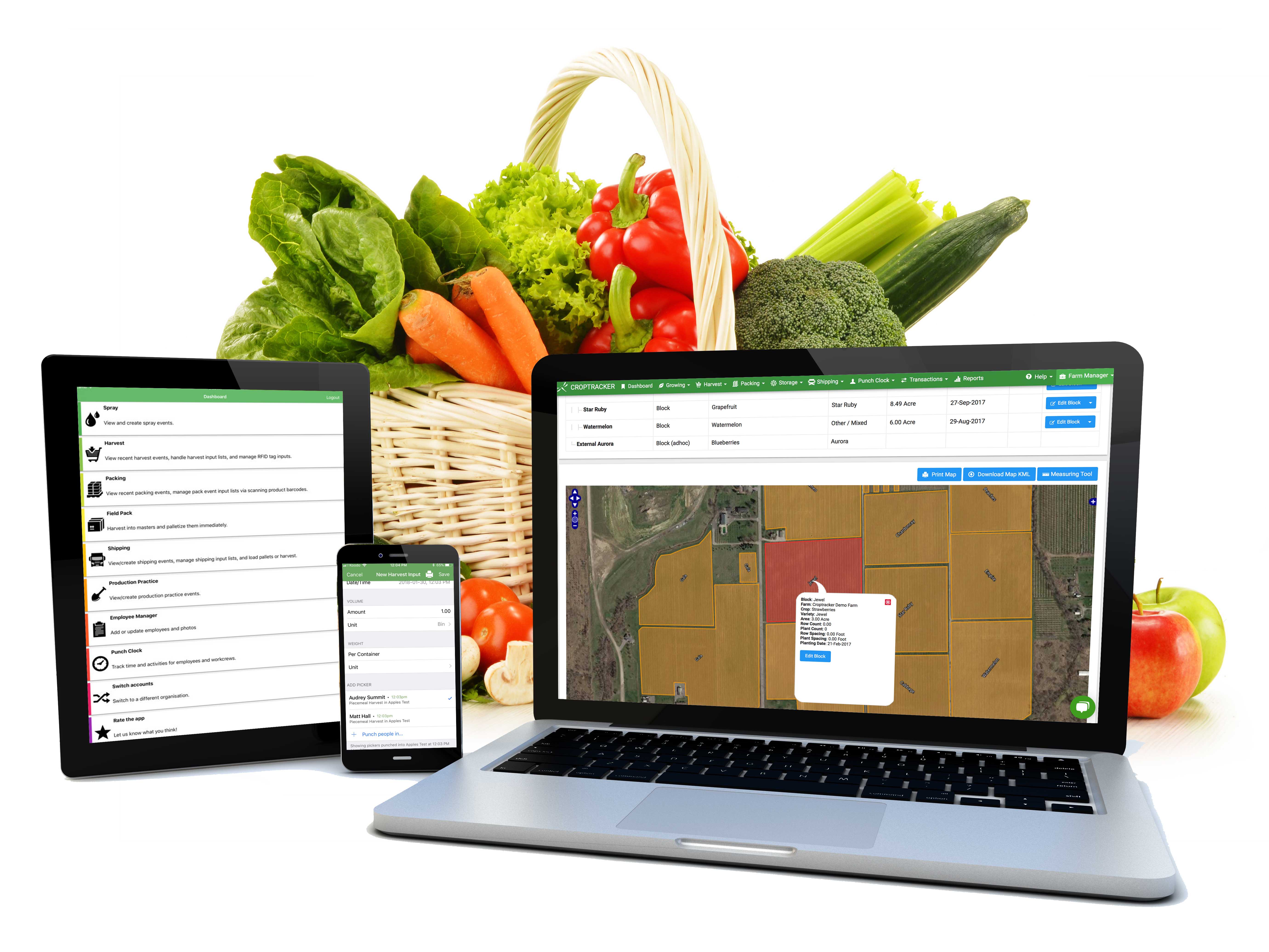
Croptracker's Punch Clock module was built
for specialty crop labor tracking. It handles the complexity that
makes spreadsheets error-prone.
Piece rate automation
Set piece rates per employee, per crew, per variety, and per activity. The system calculates each picker's earnings automatically. It compares the result to the minimum wage floor you configured when you set up the employee. If the piece-rate earnings fall below the hourly minimum, the report flags the top-up amount. No manual math, no rounding errors.
The system reports top-ups — it doesn't process payments. The data feeds directly into your payroll software or accounting system, so your bookkeeper gets clean numbers with all compliance calculations already done.
Field-to-office sync
Crew leaders use the Croptracker mobile app to record bucket tallies, punch in/out shifts, and switch between locations and activities. The app works offline-first — critical for remote blocks with no cell coverage. Data syncs to the office server as soon as connectivity is available. The office team sees real-time progress without chasing paper tallies.
Hourly and hybrid tracking
For crews on hourly pay, Clock in and out directly on the mobile app or via a kiosk at the crew staging area. For operations that use both hourly and piece-rate workers (or where the same worker does both types of work on the same day), the system handles the hybrid scheduling. Switch between hourly and piece-rate on the app.
Block-level labor costs
Because Punch Clock records labor against specific blocks and activities, labor cost attribution happens automatically. You can see exactly which blocks are profitable and which are bleeding money. The Total Work Cost Report combines piece-rate costs, hourly labor costs, and equipment run-time costs by location and activity.
This is the kind of managerial accounting that spreadsheets simply can't produce at scale. Croptracker is not a substitute for your bookkeeper or compliance accounting software. It produces and calculates field data that you feed cleanly into your accounting system.
Compliance guardrails
The system tracks weekly hours per employee and calculates overtime automatically where applicable. It records rest break times and meal periods. It maintains digital Work Logs that employees can review and sign off on. For full labor reporting across all your modules, the daily timesheet, piecework report, and payroll report all generate from the same data your crews are already capturing.
Integration with harvest data
Pair Punch Clock with the Harvest module and labor records link directly to bin inventory and yield tracking. Individual picker output connects to harvested quantities. That labor cost is attributed to the block, then flows through to profitability analysis. Labor is no longer an isolated data silo.
Real-World Numbers: Spreadsheet Errors That Add Up
Let's look at concrete examples for a mid-sized operation.
Example 1: Minimum wage top-up liability. A 50-picker operation runs piece rate at $0.75 per bucket. The local minimum wage is $16/hour. A picker who averages 5 buckets per hour earns $3.75 per hour at piece rate — and that picker works an 8-hour day. Total piece earnings: $30. Minimum wage requirement for the day: $128. Top-up owed: $98 per picker per day.
If the spreadsheet missed even one top-up calculation, that's $98 in underpayment for one picker for one day. For 50 pickers, a single missed calculation per worker per day = $4,900 in liability for that day alone.
These numbers assume a high gap between piece earnings and minimum wage, which is typical early-season or in regions with higher minimum wages. The actual gap depends on your piece rate, your pickers' speed, and your jurisdiction's minimum wage. The point is that the exposure is direct, measurable, and per-picker.
Example 2: Time savings. Mr Apple, a major New Zealand apple exporter, saved 10 hours per week in the payroll department alone after switching from manual tracking to Croptracker. Their senior staff save 4-8 hours per week per manager. Across their operation, they logged 600-800 hours saved per week and over 110,000 total working hours saved across 4 years of use.
Your operation is likely smaller than Mr Apple. But the principle holds: when piece rate math, overtime tracking, and multi-crew reconciliation happen automatically, the hours you reclaim are real.
The context your operation needs
Before you decide, understand the current labor shortage landscape and what it means for your workforce planning. As labor scarcity increases, every hour your management team can reclaim from administration is an hour spent on retention, training, and crew productivity.
When You Should Actually Keep the Spreadsheet
Not every operation needs labor tracking software. Keep your spreadsheet if:
- You have a single crew of 5 workers or fewer
- Everyone is on simple hourly pay — no piece rate, no hybrid scheduling
- You have no upcoming labor audits or compliance reviews
- Your operations are stable and not scaling
If that describes your farm, the spreadsheet is still doing the job. Software makes sense when your operation crosses the threshold where manual tracking introduces errors, compliance risk, or administrative time that outweighs the subscription cost.
Making the Switch: What It Actually Takes
If you're ready to move past spreadsheets, here's what the transition looks like in practice:
Setup
Croptracker's punch clock configuration involves: setting up your employees and pay rates in Punch Clock Admin, defining your piece-rate amounts and harvest units, creating work crews and assigning crew leaders, and ensuring your field map is current. For existing operations, you can upload employee data via CSV. Our support team offers setup assistance to help you configure the system before crews arrive.
Training
Crew leaders typically learn the mobile app in the same day they receive it. The interface is built for field use — large buttons, offline capability, simple workflows. There's no multi-week training program. We have step-by-step Knowledge Base tutorials for every Punch Clock workflow.
Modular approach
You don't need to adopt the entire Croptracker platform. Start with Punch Clock alone. Track labor, generate payroll reports, and evaluate the return. Add the Harvest module later to connect labor data to yield. Add Spray to link worker safety records. The modular pricing means you pay only for the modules you use.
Pricing
Croptracker starts at $27.50 USD per user per month with a minimum of 10 users. For a 50-person operation, that's roughly $275-1,375 per month depending on how many licensed user seats you need (typically 10-25 for crew leaders, admin, and management). Compare that to the 10-15 hours per week of payroll administration and the compliance risk you're carrying with spreadsheets. The numbers usually work out.
Decision Framework: Is It Time for Software?
Answer these five questions. If more than two are yes, it's time to look past the spreadsheet.
| Question | Yes | No |
|---|---|---|
| Do you use piece rate pay — or plan to this season? | ☐ | ☐ |
| Do you have 3+ crews or 15+ workers during peak? | ☐ | ☐ |
| Have you made payroll errors in the past 12 months? | ☐ | ☐ |
| Are you facing upcoming labor audits or compliance reviews? | ☐ | ☐ |
| Do you spend 5+ hours per week on labor admin during harvest? | ☐ | ☐ |
If you checked "yes" on any of the first two, the move to software is worth the conversation alone. Piece rate and multi-crew operations are where spreadsheets break. The other three questions help you understand the urgency.
Make the Move Before Harvest Pressure Peaks
If your crew is growing, your pay structure is more than simple hourly, or you've ever questioned your payroll numbers — it's time to look past the spreadsheet.
You don't need to abandon spreadsheets entirely. You need a system that handles the calculations, compliance checks, and field-to-office data flow that your manual process can't keep up with.
Need a walkthrough before the demo? Explore the Croptracker Knowledge Base tutorials for step-by-step guidance on setting up piece rates, work crews, and daily pay schedules.
References
-
USDA ERS, "Farm Labor" — 2022 Census of Agriculture data showing wages and salaries represent 40% of production expenses for fruit and tree nut operations, and 42% for greenhouse and nursery operations. https://www.ers.usda.gov/topics/farm-economy/farm-labor/
-
U.S. Department of Labor, FLSA Fact Sheet #12 — Piece Rate Pay — Guidance on minimum wage compliance, overtime calculations, and the requirement that piece-rate earnings must not fall below the local minimum wage when converted to hourly equivalent. https://www.dol.gov/agencies/whd/fact-sheets/12-minimum-wage-protection
-
California Labor Code §226.2 (AB 1513 / AB 1066) — Rest and recovery period compensation requirements for piece-rate workers. Requires separate hourly-rate compensation for rest periods at the higher of the average hourly rate or state minimum wage. 10-minute rest break required per 4 hours worked. https://leginfo.legislature.ca.gov/faces/codes_displaySection.xhtml?sectionNum=226.2.&lawCode=LAB
-
Carranza v. Dovex Fruit Co. / Lopez Demetrio v. Sakuma Brothers Farms (2018) — Washington State Supreme Court ruling requiring employers to provide and separately track time for incidental tasks performed by piece-rate agricultural workers. Must be compensated at hourly rates even for workers otherwise paid on piece rate.
-
USDA ERS, "Farm Labor Expenses: Evidence from the 1997–2022 Census of Agriculture Data" — Analysis showing continued growth in farm labor expenditures from 1997 through 2022. https://www.ers.usda.gov/publications/?pubid=113431