
In today's highly regulated agricultural landscape, tracking fertilizer applications by the brand name and application rate alone is no longer sufficient for comprehensive nutrient analysis or environmental impact reporting. With combination fertilizers, juggling multiple active ingredients can feel like guesswork. Fortunately, Croptracker's Spray module and Active Ingredient tracking features are built to eliminate that uncertainty.
Benefits of macro nutrient tracking
Growers benefit significantly from tracking macro nutrient components of fertilizers because it provides precision, control, and consistency in their nutrient management program. The ultimate goal when fertilizing is to deliver the exact amount of specific nutrients the crop needs at a particular growth stage. The guaranteed analysis (e.g., NPK ratio like 10-10-10) tells you the precise percentage of actual elemental nitrogen (N), phosphorus (P), and potassium (K) you are applying. To maintain a target nutrient level (e.g., 150 parts per million (ppm) of N), the grower must use the NPK percentage in the calculations.
Additionally, relying on the active ingredients makes the growing process standardized and repeatable, regardless of supply chain issues or price fluctuations on specific brands or nutrient sources. If a grower runs out of Brand A (a 15-5-15 fertilizer) but can only source Brand B (also a 15-5-15), they know the nutritional impact is the same, even though the brands or filler materials might be different.
Detailed records are often required for certifications, audits, and compliance with environmental regulations. In many regions, there are restrictions on the total amount of nitrogen or phosphorus that can be applied to prevent runoff and water pollution. Detailed records of the active ingredients are necessary to prove compliance with these limits. And in the worst cases, when a crop fails, detailed records of the active ingredient application help agronomists and consultants quickly trace potential causes, isolating whether the problem was a nutrient imbalance, a disease, or another factor.

Fertilizer nutrient tracking definitions
An active ingredient is the part of the fertilizer to which its performance as a fertilizer is attributed.
Macro nutrient refers to nitrogen (N), phosphorus (P), or potassium (K) as they are the chemical elements most necessary for plant growth.
Micro nutrients are other elements that support plant growth, eg. sulfur (S), but are not necessary in the same quantities as NPK.
A Safety Data Sheet is a comprehensive document that provides essential information about the product to ensure its safe handling, use, storage, and disposal. A version of this information is required for chemicals that can potentially harm humans or the environment by WHIMIS in Canada, OSHA in the US and ECHA in the EU.
On some SDS the active ingredients are potentially harmful and if there is not a batch analysis about the precise amount of these chemicals it will be listed with a minimum and maximum % range. Generally it is best practice to use the Guaranteed Active % on the chemical label when tracking for plant nutrition purposes, but in some contexts, like reporting for environmental impact, using the maximum % from the ingredient range is required.
These terms refer to the minimum percentage by weight of the claimed nutrients in the fertilizer. This is required information on fertilizer labels and often the NPK %s will be directly listed in the name of the fertilizer. For plant nutrition optimizing, this is the % ratio that should be used for application rate calculations.
Adding active ingredients to fertilizers in Croptracker
Croptracker Spray module has been helping growers track their spray inputs for over two decades and in that time, most of the focus has been on pesticide and insecticide applications due to their stringent mandatory reporting requirements. However, in recent years, we had more calls from our users to help them track their fertilizer and nutrient applications. As a result, we have developed Active Ingredient tracking to our chemical inventory management system.
In order to take advantage of this feature, users will need the Spray module and to navigate the ‘Chemicals’ screen on the Croptracker browser application to start. Depending on the crops you have in your Field Map and your organization’s location, this list may already be populated from Croptracker’s database of agricultural chemicals. Croptracker does not maintain a universal list of fertilizers and growers wishing to track fertilizer applications will typically add their own ‘Chemical’ to accomplish this. Hitting the ‘+ Add New Chemical’ button on the top right of the list will take you the screen displayed below:
Not all the fields on this screen will be relevant when adding fertilizers. We will highlight the most important fields to enter for tracking and reporting on NPK based fertilizers by adding an example fertilizer. It is helpful to have the Safety Data Sheet (SDS) and the fertilizer label handy for this process.
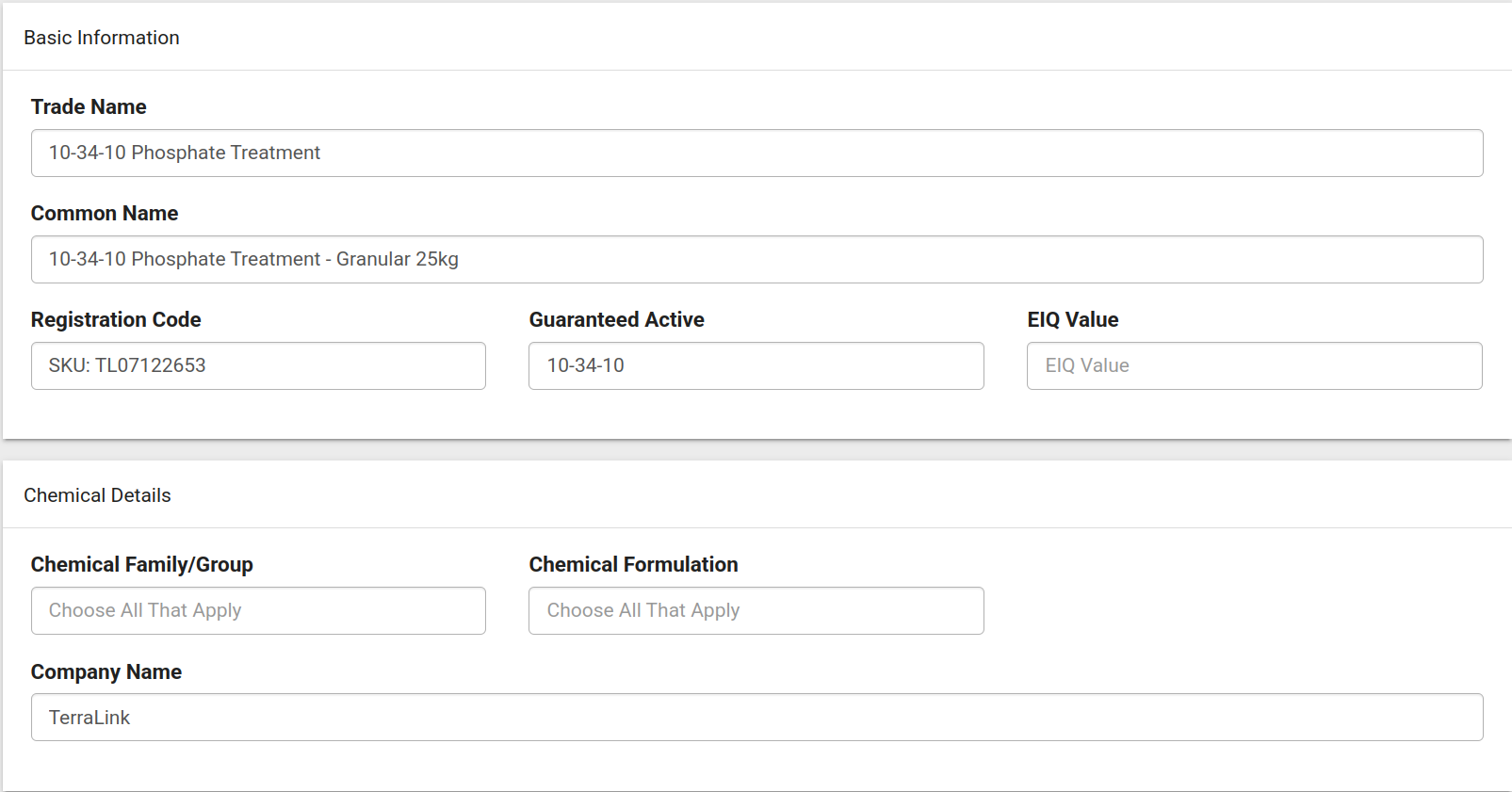
First off, adding the Trade name and any other Common names will make this blend easier to search for in your chemical list. The next section can be left blank as it applies to pesticides and insecticides apart from the Company Name. We have added the manufacturer of the fertilizer here.
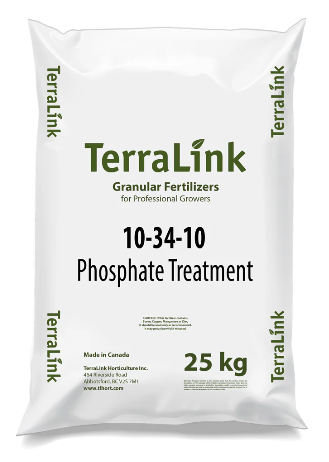
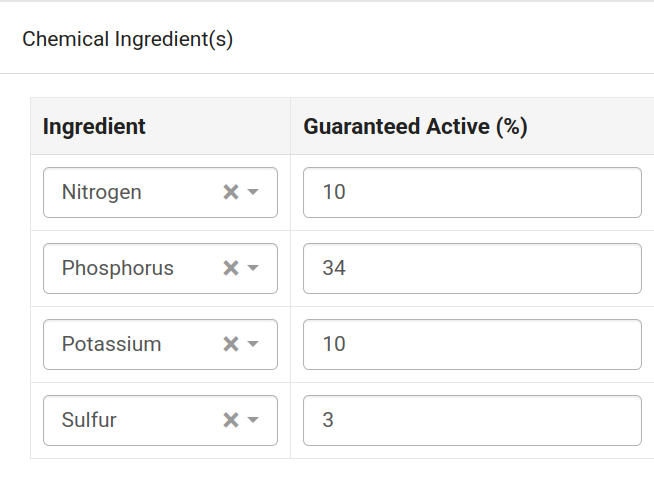
The third section on the page is where you can add and start to track active ingredients in this chemical. The fertilizer we are using is an NPK based one also with sulfur (S). This fertilizer has both a SDS and a label available digitally which have been downloaded in advance for reference. For this use case, the purpose of tracking the ingredients is for precision nutrient tracking so we will be using the guaranteed minimum ingredient percentages.
There are two ways to enter the active ingredient concentration in the chemical: with the Guaranteed Active (%) or the Concentration. Most commonly users will enter the Guaranteed Active (%) as this is posted on most fertilizer labels in the same format. The label for this fertilizer shows the guaranteed minimum analysis which will be used to enter the Guaranteed Active (%) in Croptracker.
In Croptracker, the Ingredient list is pre-loaded with common input ingredients and nutrients. In order to accurately report on these nutrients cumulatively using Croptracker’s Chemical Ingredient Use Report, we recommend using the elemental name and not specifying the specific form of the ingredient. For example, instead of listing Urea or Nitrate, select nitrogen.
Guaranteed minimum analysis on the chemical label vs. Ingredient Guaranteed Active % in Croptracker:

In the next section, select ‘Fertilizer’ as the Chemical Type. We also recommend uploading the Safety Data Sheet in this section for worker and environmental safety reference.

The last two sections are optional for ingredient reporting but highly recommended for preventing misapplication. By specifying if this fertilizer is organic and selecting the appropriate crop types (from your field map), you can restrict its use to suitable growing areas during future Spray events.

Reporting on active ingredients and nitrogen emissions in Croptracker
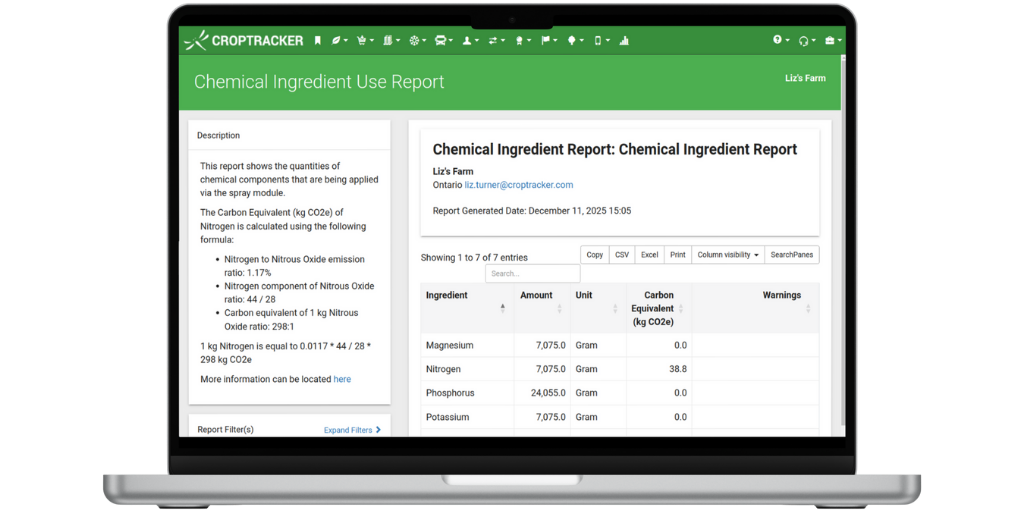
Reporting on specific ingredient use will happen after the fertilizers you have added are selected and applied in Spray events in Croptracker. There are many spray reports available in Croptracker that group data by the Chemical, but the one you want to select for ingredient reporting is the aptly named Chemical Ingredient Use Report.
This report will group by chemical and if not further filtered will group all the amounts applied to all growing areas. In order to find our specific amounts per each crop or growing area, the Block(s) Filter and the Search Panes can refine what areas are added to the report.
This report additionally reports on the Carbon Equivalent of any nitrogen-based fertilizer applied. Nitrogen has the biggest environmental impact compared to other agricultural chemicals and reporting on its use and impact specifically is required in some regions and with some certifications. The formula used to calculate the carbon equivalent of nitrogen is displayed in the report description.
For growers seeking to maximize yield and efficiency, tracking active ingredients is vital, offering precision, control, and consistency in nutrient management. By moving beyond simple fertilizer brand names and focusing on elemental NPK percentages, growers establish a clear, repeatable foundation for plant nutrition. Detailed ingredient tracking ensures that crops receive the exact nutrient needed for optimal growth, leading to stronger plants that are better equipped to handle disease, pest, and weather stress.
Croptracker's Active Ingredient tracking features provide the crucial data needed for mandatory reporting and environmental stewardship on the most impactful elements: nitrogen and phosphorus. The ability to precisely quantify nutrient application allows growers the chance to limit their environmental impact, especially concerning nitrogen and phosphorus runoff, and facilitate compliance with increasingly strict regulation. By leveraging features like the Chemical Ingredient Use Report, growers can gain the necessary insight to inform strategic change.